How to Track Workouts From YouTube
YouTube is the world's largest free fitness library — but watching videos is not the same as following a plan. Save videos with timestamps, log sets and reps, and turn scattered videos into a routine you can repeat.
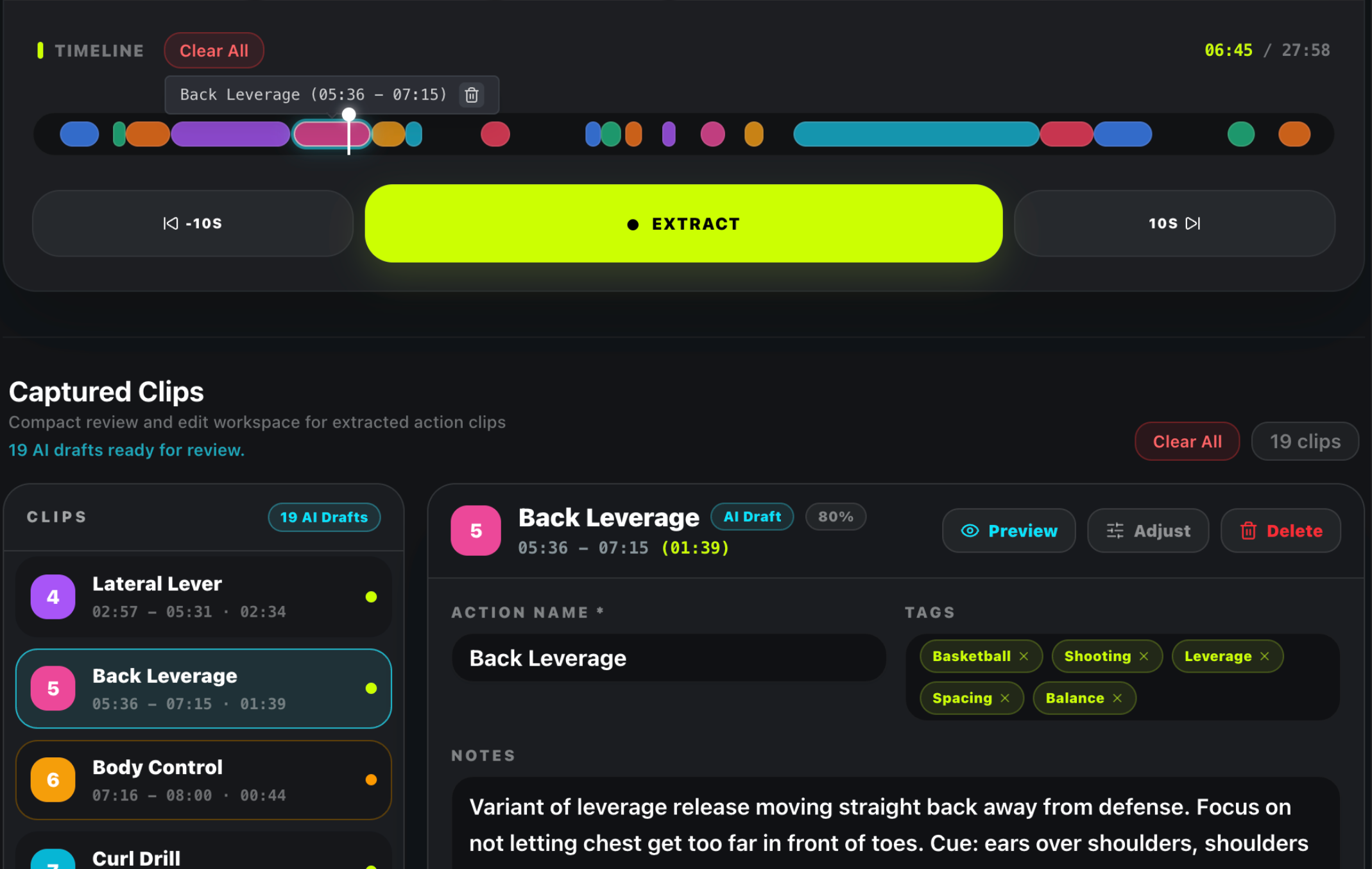
YouTube is the world's largest free fitness library — but watching videos is not the same as following a plan. This guide shows you how to track workouts from youtube so every session builds on the last: save the right videos, log what you actually complete, and turn scattered videos into a routine you can repeat.
Before You Start: How to Track Workouts from YouTube with Basic Notes
If you are not ready to sign up for anything, start with a simple system that works with tools you already have. Open a notes app or a spreadsheet on your phone, create a page called “YouTube Workouts,” and use these three columns every time you train: video title, timestamp you started at, and what you actually completed (sets, reps, or duration). This is the minimum-viable tracking habit. Do it for one week and you will immediately see which videos are worth keeping in rotation and which ones you never return to.
The manual method works, but it has a ceiling: after two weeks most people stop updating the spreadsheet, the timestamps get lost when a creator deletes a video, and the notes never turn into a repeatable routine. The four-step system below solves each of those problems, giving you a clear blueprint for how to track workouts from youtube whether you use TrainFlow's YouTube workout tracker or build your own workflow.
Step 1: Save the Right Video (How to Track Workouts from YouTube)
Not every YouTube workout deserves a permanent slot in your training library. Before you save anything, ask yourself one question: will I actually do this workout again next month? If the answer is no, skip saving it. If yes, save it immediately after the session while the memory is fresh.
When you save a video, decide whether you need the full follow-along session or only specific exercises within it. A 20-minute HIIT follow-along where the value is the pacing and the timer cues works best saved as one complete action — your goal is to finish the session, not to dissect it. But a 45-minute strength tutorial that covers six different lifts with coaching cues in between? That one deserves to be split into timestamped segments: bookmark the exact start of each lift so you can jump straight to the goblet squat or the Romanian deadlift without scrubbing through the video.
Be precise with your timestamps. If an exercise starts at 12:34 and the setup explanation ends at 13:10, bookmark 13:10 — not 12:34. You want the bookmark to drop you into the first working rep, not the preamble. This small habit saves 30–60 seconds every time you return to a saved video, which adds up to hours over a year of training.
Step 2: Add Context (How to Track Workouts from YouTube Effectively)
A YouTube video shows you how to do an exercise. It does not remember what you did last time or what you plan to do next time. That gap is where tracking actually happens.
For every saved action, write down three things: the load you used (even if bodyweight, note the variation), the target reps or duration, and one coaching cue that helped you lock in the form. Example: “Goblet squat — 24 kg — 3×8 — cue: drive knees out, pause at bottom.” That one line, written after your first session with a video, turns a generic YouTube workout into a personalized training reference.
Also note what did not work. If a video had five exercises and the third one aggravated your shoulder, write that down. Six months from now you will not remember which video hurt your shoulder — but your notes will. This is the difference between “I think I did this video before” and “I know exactly what happened when I did this video before.”
Step 3: Build a Routine (How to Track Workouts from YouTube into a System)
Saved actions are raw ingredients. A routine is a recipe. The step most people skip is arranging those saved video actions into a structured session with a clear order, rest periods, and an expected total time.
You have three options when building a routine from YouTube workouts:
- Keep one creator's full session intact. If Caroline Girvan's 30-minute dumbbell workout works perfectly for you as-is, save it as one block and slot it into your weekly schedule without modification.
- Combine sections from multiple videos. Take the warm-up from one video, the main strength block from another, and the finisher from a third. This is how you build a custom program without recording your own content.
- Mix video actions with exercises that do not need a video. Maybe your warm-up is a familiar bodyweight flow that needs no reference, but your main lifts benefit from a coach's cues on video.
Before you finalize the routine, set the rest intervals between actions and preview the total session duration. A well-structured routine should tell you upfront: this will take approximately 42 minutes. That number is what lets you fit training into a busy day — you know before you start whether you have time to finish.
Step 4: Run the Routine and Log Sets (How to Track Workouts from YouTube Live)
Tracking is not watching. Tracking is doing the work and recording the result. When you run a routine, your phone should show you one action at a time — the current exercise, the target, and a way to log what you did. You should not need to unlock your phone, open YouTube, find the video, and scrub to the timestamp between every set. That friction is why most people track one session and never do it again.
A good tracking session captures three data points per exercise: the load you actually lifted, the reps you actually completed, and whether you finished all planned sets. If the target was 3 sets of 10 at 32 kg and you did 10, 9, 8 — log all three. That drop-off from set 1 to set 3 is the most useful training data you will ever collect. It tells you exactly when to increase volume, when to deload, and when a particular exercise has stopped being productive.
At the end of the session, take five seconds to note how the workout felt overall: too easy, just right, or too hard. This subjective rating, combined with the objective set data, is what turns a tracking habit into a training system. Over weeks and months, the history shows you which routines you consistently complete, which ones you avoid, and whether your performance is trending up or plateauing.
Make Your Data Work: How to Track Workouts from YouTube Over Time
Two weeks of consistent tracking gives you enough data to make one meaningful training decision. Look at your completed sessions and ask:
- Which video do I return to most often? That is your highest-value content. Build more routines around it.
- Which exercise am I consistently failing to complete? Either the load is too high, the volume is wrong, or the exercise does not belong in your program.
- How often am I actually training? Most people overestimate their frequency by 30–40%. The log does not lie.
Use these answers to adjust your routine for the next two weeks. Remove the exercises you dread, double down on the ones you complete with good form, and be honest about how many sessions per week are realistic. A tracking system is only as useful as the decisions you make from the data it collects.
Ready to put this into practice? Try our free generator, or explore the routine builder to assemble your saved videos into a weekly plan.
Frequently Asked Questions
What is the easiest way to track a YouTube workout?
Start with a notes app and three columns: video title, timestamp, and what you completed. Do this for one week. If the friction of switching between YouTube and your notes app becomes annoying, switch to a workout tracker that keeps the video reference and the log on the same screen. The easiest method is the one you will actually stick with — for most people that means reducing the number of apps they touch during a training session from three (YouTube, notes, timer) to one.
Should I use a YouTube playlist or a workout tracker?
Use a YouTube playlist when your only goal is viewing order — which video comes next. Use a workout tracker when you also need exercise-level detail: timestamps per movement, target sets and reps, rest timers between exercises, and a history of what you completed in each session. A playlist tells you what to watch. A tracker tells you what you did, whether it worked, and what to do next week. They solve different problems.
How can I track follow-along workouts effectively?
For follow-along workouts where the value is in the pacing and the coach's cues, save the entire video as one action rather than splitting it into individual exercises. After the session, log two things: whether you completed the full workout, and a one-line note on how it felt (too easy, just right, or too hard). Over time, tag each follow-along by type — HIIT, strength, mobility — so you can see which categories you are actually completing versus which ones sit in your library untouched.
What if the YouTube video I use gets deleted?
This is the biggest risk of building a training system on YouTube videos — creators delete content, channels get terminated, and videos get set to private without warning. The only defense is to store your exercise notes, timestamps, and set history separately from the video itself. A tracker that keeps your log independent of the video file protects your training history even if a creator takes a video down tomorrow.