Workout Builder Personal Training Software
Discover how modern workout builder personal training software empowers both independent coaches and self-directed trainees. Build client-grade modular routines with precision rest timers and video cues—without paying enterprise software fees.
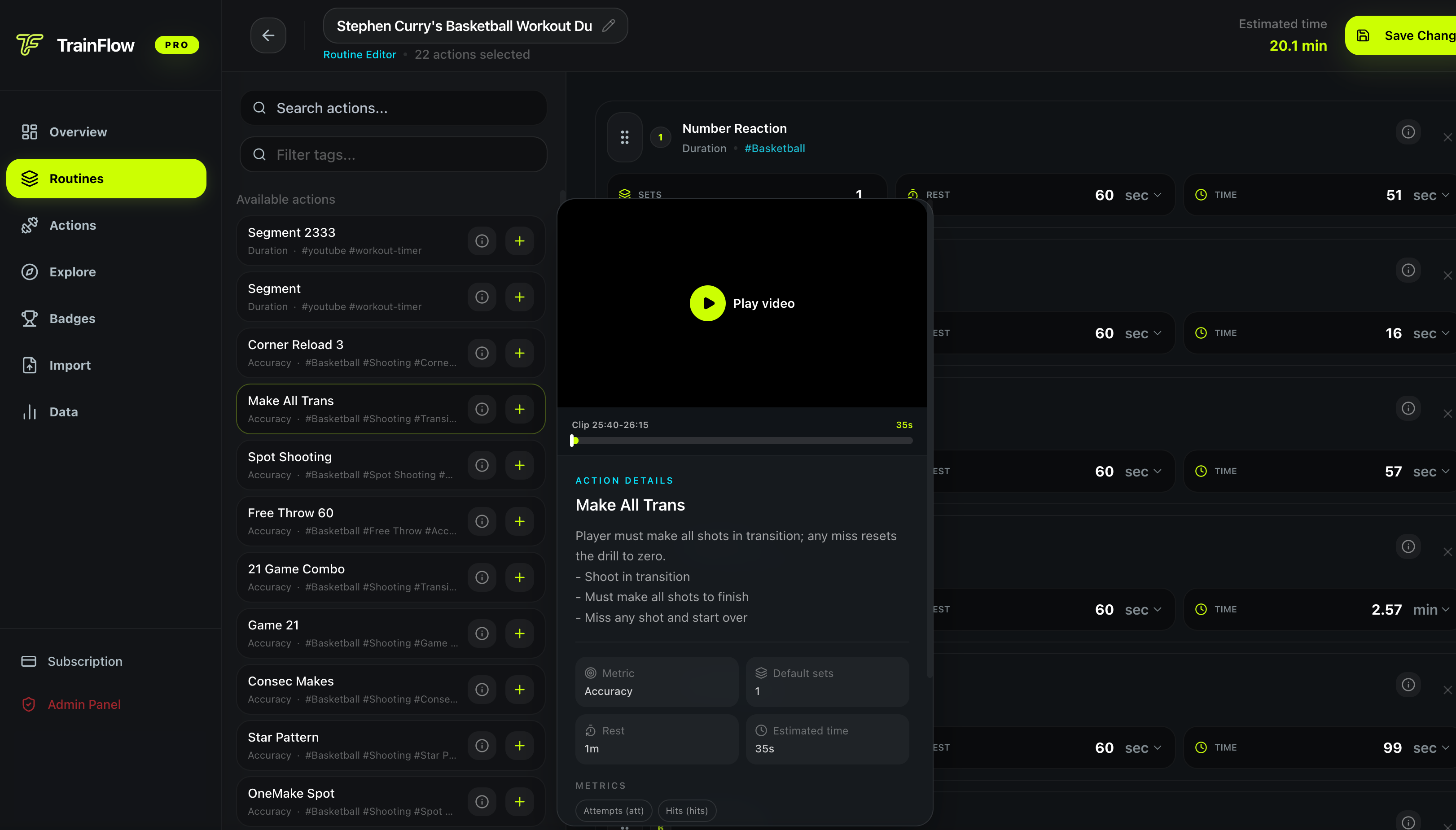
Desktop Workout Studio: Construct reusable exercise actions, organize modular supersets, and configure set-by-set rest parameters inside TrainFlow's routine editor.
Executive Summary: The Disconnection in Conventional Personal Training Software
For over a decade, the commercial fitness software market has focused almost exclusively on the business needs of personal training gyms: client invoicing, credit card auto-billing, automated lead emails, and liability waivers. While platforms like Trainerize, TrueCoach, and Everfit solved administrative bottlenecks for fitness businesses, they neglected the most crucial element: the actual in-gym workout builder and execution experience.
As a result, both independent fitness coaches and self-directed trainees are stuck with cumbersome, sluggish interfaces. Coaches spend hours clicking through nested menus to assemble a simple superset, while trainees in the gym squint at tiny text boxes on their phones, guess their rest intervals, and switch between three separate apps to find video form demonstrations.
Modern workout builder personal training software fundamentally re-centers on the workout itself. By separating routine design into modular, reusable exercise actions and providing distraction-free mobile web execution with automated rest timers, TrainFlow delivers client-grade program engineering without enterprise subscription bloat.
Stop rebuilding workouts from scratch. Treat exercises as atomic building blocks with saved notes, rest targets, and video moments.
Eliminate phone distractions between sets. Automatic rest countdown timers keep athletes paced for maximal hypertrophy and recovery.
Replace clunky 3D computer models with real coaching demonstrations linked to exact YouTube video timestamps.
4 Pillars of Modern Workout Builder Personal Training Software
How action-driven training architecture bridges the gap between desktop routine planning and high-intensity mobile execution.
Modular Action Library Architecture
Deconstruct monolithic routines into atomic, reusable exercise actions with pre-configured parameters.
- Create once, reuse anywhere: Save bench press, goblet squat, or interval drills as standalone modules.
- Custom default parameters: Attach target rep brackets, default weight, and rest interval presets.
- Multi-discipline tags: Organize actions by movement pattern, equipment type, or sport discipline.
Precision Video Timestamp Integration
Eliminate ambiguous 3D animations by linking exact YouTube timestamps from real-world lifting coaches.
- Exact segment bookmarking: Save the precise 15-second setup demonstration rather than the whole 20-minute video.
- Instant technique recall: Access cues in a single tap before initiating a heavy working set.
- Zero app switching: Video playback is integrated directly into the mobile workout execution player.
In-Session Pacing & Rest Countdown Automation
Enforce strict workout density with automated full-screen rest timers calibrated to movement intensity.
- Phosphocreatine restoration: 120–180s automated countdowns for primary multi-joint compound lifts.
- Hypertrophy density: 60–90s countdowns for accessory volume to drive metabolic fatigue.
- Haptic & audio alerts: Visual and audio signals notify you when your next set begins so you never drift onto social media.
Dual-Screen Seamless Workflow
Design and structure training comfortably on desktop; execute distraction-free on mobile.
- Desktop command center: Drag, drop, reorder, and configure periodized blocks on a full screen.
- Mobile PWA execution: Lightweight, ultra-responsive mobile player optimized for one-thumb gym operation.
- Instant cloud sync: Changes made on desktop appear immediately on your smartphone without manual exports.
Enterprise Coach Platforms vs. TrainFlow Workout Builder Engine
Compare the performance, usability, and financial differences between legacy PT software and TrainFlow.
| Software Feature | Legacy PT Platforms (Trainerize/TrueCoach) | TrainFlow Workout Builder |
|---|---|---|
| Pricing Model | Expensive monthly subscriptions ($30 to $150+/mo) with forced client tier gating. | Free core workout generator and routine builder with zero forced subscriptions. |
| Target Audience | Administrative coaches focused on client billing, invoice generation, and contracts. | Athletes, lifters, and modern coaches who prioritize in-gym workout execution. |
| Exercise Demonstrations | Outdated, low-polygon 3D digital avatars that ignore real human lifting mechanics. | Precision YouTube video timestamp clips from world-class coaches embedded in actions. |
| In-Session Rest Timing | Basic stopwatch or none at all, requiring separate phone timer apps during workouts. | Full-screen automated rest countdown timers triggered automatically after each set. |
| Interface Speed & Cleanliness | Bloated with client feeds, marketing upsells, nutrition tracking, and chat widgets. | Ultra-clean, dark-mode action interface built for maximum focus and zero distraction. |
Inside TrainFlow: The Action-Driven Training Engine
Experience the dual-screen harmony designed for modern lifting: assemble periodized workouts with full drag-and-drop control on desktop, then run your session with instant automated rest timers on mobile.
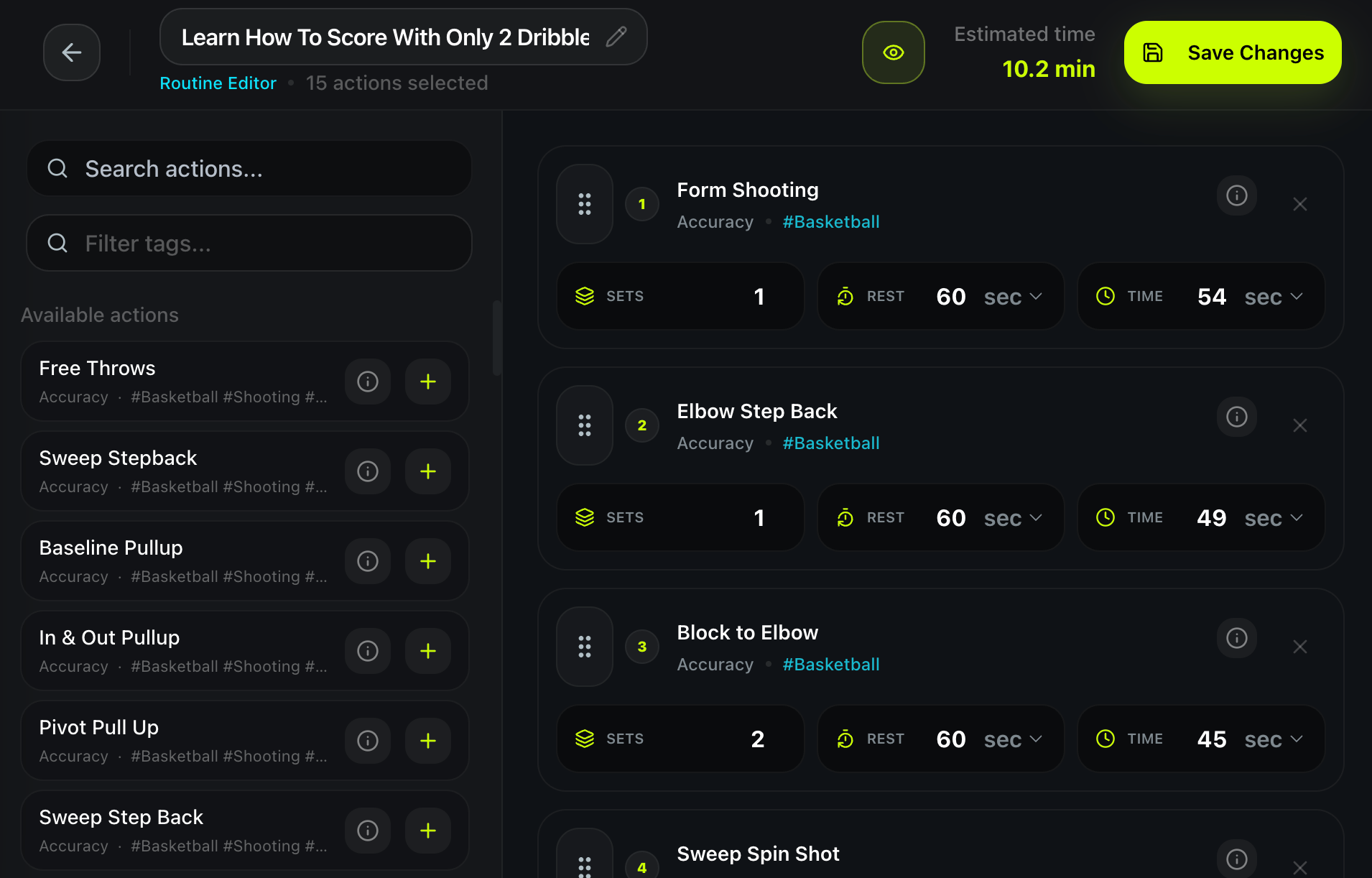
Desktop Command: Sequence exercises, customize target rep brackets, set individual rest timers, and preview total workout duration before stepping onto the gym floor.
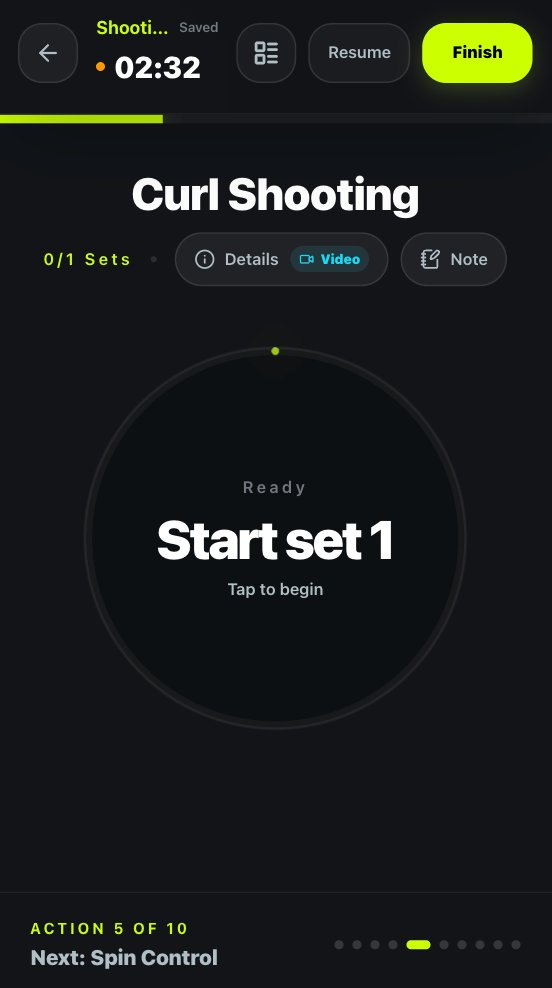
Mobile Focus: Clean, high-contrast timer display keeps you focused on the workout. Tap once to log completed sets and trigger the next rest countdown automatically.
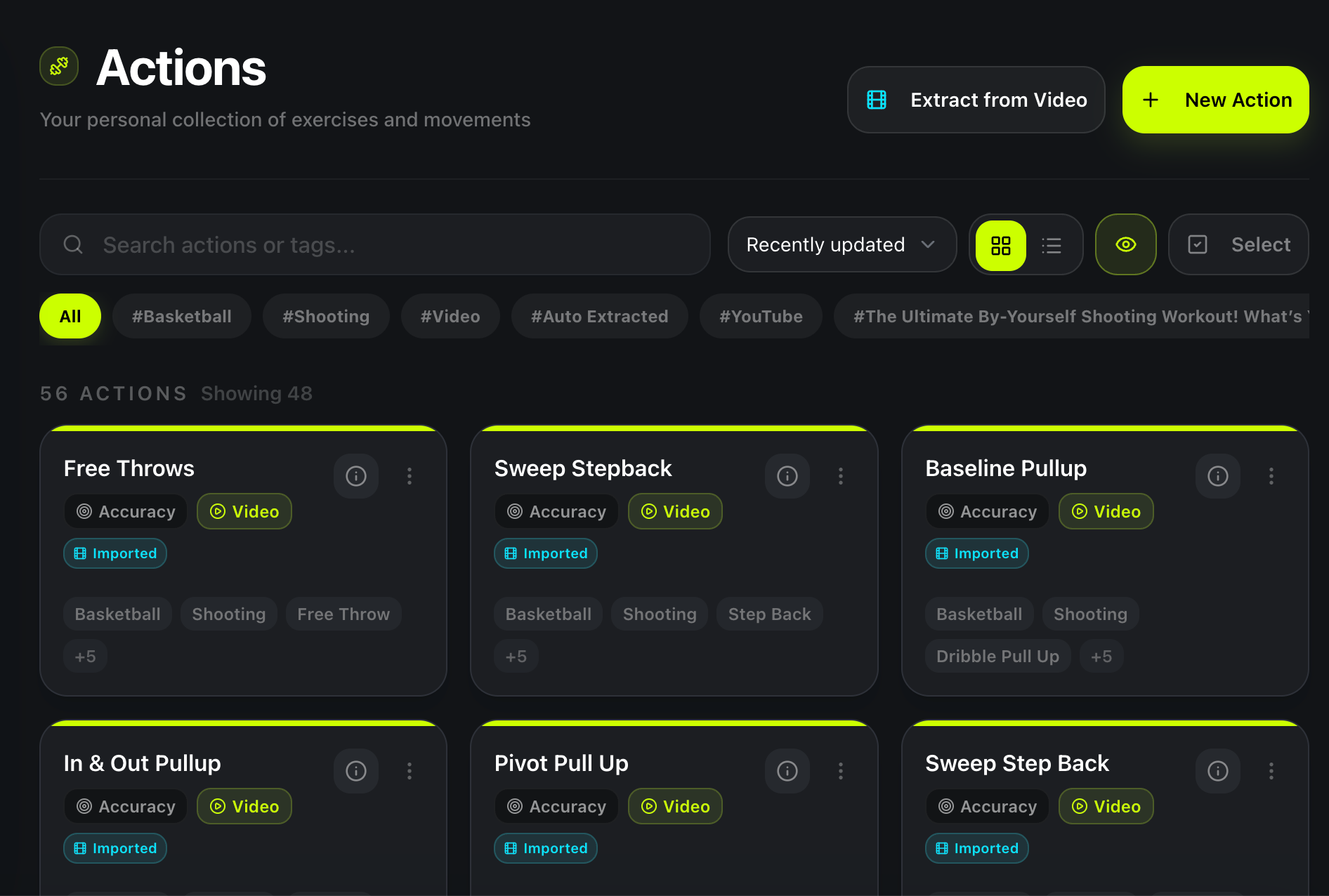
Reusable Action Library: Build an archive of your favorite compound lifts, mobility drills, and conditioning blocks. Never re-type exercise notes or search for video links twice.
3 Pitfalls to Avoid in Workout Builder Software
Recognize the architectural compromises that ruin workout execution and waste your training budget.
Paying for Enterprise Feature Bloat
Enterprise personal training platforms force you to pay for credit card processors, automated marketing funnels, and client invoicing systems. If your primary goal is building world-class workout programs and executing them cleanly, you are subsidizing administrative tools you will never use.
Desktop-Only or Mobile-Only Bias
Apps that force you to type full routines on a smartphone lead to lazy, repetitive programming. Conversely, software built only for desktop makes in-gym workout tracking awkward. You need a platform that separates routine assembly (desktop) from distraction-free execution (mobile).
The Rest Timer Disconnect
Many workout builders allow you to write "Rest: 90 seconds" in a text box, but fail to provide an actual in-app countdown timer during the workout. Without automated timers, athletes inevitably pick up their phones, scroll social media, and allow rest intervals to drift into 4+ minutes of wasted gym time.
How Modern Trainees and Coaches Use TrainFlow
Explore how an independent online coach and a self-directed hybrid athlete leverage action-based workout building.
The Boutique Strength Coach: High-Compliance Client Workout Delivery
Challenge: An independent coach was spending $89/month on Trainerize just to send workout routines to 25 remote athletes. Clients frequently complained that finding exercise form videos was confusing and that the app was cluttered with unnecessary social features.
TrainFlow Solution: The coach migrated all exercise programming to TrainFlow. They built modular routines with exact YouTube technique timestamps from their own coaching channel. Clients opened the routine links on mobile with zero app installation, followed automated rest timers, and logged completed sets in under 45 minutes per workout.
| Workflow Area | Previous Legacy Setup | TrainFlow Action Architecture | Measurable Outcome |
|---|---|---|---|
| Monthly Software Cost | $89/month ($1,068/year) | $0 / month | 100% overhead reduction |
| Client Form Checks | Generic low-poly 3D avatar animations | Exact timestamped YouTube video links | Fewer technique questions via DM |
| Workout Completion Pace | 65–75 mins (unregulated rest) | 48–52 mins (automated countdowns) | 30% faster session completion |
The Self-Coached Hybrid Athlete: Periodized Strength & Conditioning Split
Challenge: A competitive lifter wanted the freedom to combine heavy barbell compound lifts, kettlebell conditioning rounds, and mobility flows without dealing with rigid gym software that only supports standard bodybuilding exercises.
TrainFlow Solution: Using the desktop routine builder, the lifter organized their 4-day split into dynamic movement blocks: heavy strength sets with 180s rest, followed by timed kettlebell supersets with 45s rest. On mobile, the player handled transitions between weight logs and interval countdowns seamlessly.
Frequently Asked Questions
Evidence-backed answers to questions about workout builder personal training software and modern training workflows.
What is workout builder personal training software, and who is it for?↓
Workout builder personal training software is specialized digital tooling designed to structure, sequence, and manage progressive training routines. Historically built exclusively for professional coaches to administer remote clients, modern action-driven platforms like TrainFlow now empower both independent personal trainers and self-directed trainees to build custom, client-grade workout splits with automated rest timing, video cues, and set tracking without paying enterprise software fees.
Why is traditional personal training software like Trainerize or TrueCoach so expensive?↓
Conventional personal training platforms charge between $30 and $150+ per month because their business models bundle extensive administrative overhead: automated payment processing, recurring billing subscriptions, client messaging, in-app meal planning, and marketing funnels. For coaches and self-coached athletes who strictly need a fast, precise workout builder and distraction-free mobile execution, paying for this enterprise bloat is unnecessary.
Can an individual athlete use personal training software without hiring a personal trainer?↓
Absolutely. In fact, advanced and self-directed lifters often get better results using workout building software than following static influencer templates or messy spreadsheets. Software like TrainFlow allows self-coached lifters to organize their own exercises, specify exact rest intervals, attach technique cues, and run structured sessions on mobile with zero coach subscription required.
How does TrainFlow handle exercise form guidance without generic 3D animations?↓
Most personal training apps provide generic, low-polygon 3D computer animations that fail to convey true human lifting biomechanics, setup cues, or individual bar path nuances. TrainFlow solves this by allowing you to attach exact YouTube video timestamp clips directly to each action. You can reference real-world demonstrations from elite coaches right inside your workout flow without leaving the app.
What makes an 'action-based' workout builder superior to a standard gym spreadsheet?↓
Spreadsheets are passive grids: they do not time your rest periods, cannot play video cues, and require awkward cell zooming on a sweaty phone screen between heavy sets. An action-based workout builder turns exercises into dynamic building blocks: you assemble routines on desktop via drag-and-drop, and execute them on mobile with full-screen automated rest countdowns, tap set completion, and zero cognitive distraction.
Is TrainFlow free to use for personal workout building and client routine creation?↓
Yes. TrainFlow provides free core tools—including our interactive Workout Plan Generator and Workout Routine Builder—allowing anyone to design, customize, and run evidence-based training routines without paywalls or forced credit card trials.
Ready to Build Client-Grade Workout Routines?
Generate an evidence-based training split in seconds with our free generator, or customize every exercise, set target, and rest timer in our desktop workout builder.